

Marking the score
Ensembles and stacked instruments added several parts to the score. This page covers the elements that turn a bare grid into a printed sheet: bow spans, cued passages, annotations, and metadata.
Bow spans
Section titled “Bow spans”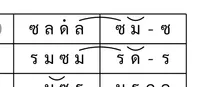
<bow> marks the start and stop of a bowing gesture on a string instrument. It pairs type="start" with type="stop" and carries a direction attribute (in or out):
<bow type="start" direction="out"/><note pitch="ด"/><note pitch="ร"/><bow type="stop"/><note pitch="ม"/>The span covers ด and ร, then ม plays without the bow mark. From ซออู้ in ท่อน 1:
<measure number="3"> <rest/><bow type="start" direction="out"/><note pitch="ด"/><note pitch="ร"/><bow type="stop"/><note pitch="ม"/></measure>Bow spans have zero duration. They do not count as beats and can cross <group>, <measure>, and <line> boundaries freely. A single-note span is valid: one note with both start and stop.
Parenthesis: cued passages
Section titled “Parenthesis: cued passages”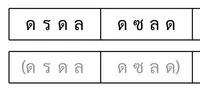
<parenthesis> marks a passage as cued or dimmed. Adding dim="true" dims the passage visually:
<parenthesis type="start" dim="true"/><note pitch="ด"/><note pitch="ร"/><note pitch="ด"/><note pitch="ล"/><parenthesis type="stop"/>From ระนาดเอก in ท่อน 2, a dimmed passage spanning two measures:
<measure number="1"> <parenthesis type="start" dim="true"/><rest/><rest/><rest/><note pitch="ร"/></measure><measure number="2"> <note pitch="ด"/><note pitch="ด"/><note pitch="ด"/><note pitch="ด"/><parenthesis type="stop"/></measure>Like bow spans, parenthesis markers have zero duration and can cross boundaries freely.
BR: New line
Section titled “BR: New line”<br> opens vertical space in the rendered score. It is a self-closing element with no attributes:
<structure> <br/> <annotation>เพลงลาวดำเนินเกวียน ...</annotation> <br/> <direction>...</direction></structure>The master score uses <br> to space a description annotation away from the direction block. Use it sparingly; the grid already provides structure.
Annotations with alignment
Section titled “Annotations with alignment”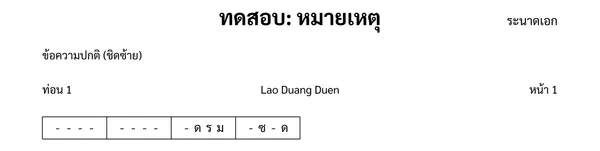
<annotation> with <text align> controls where text sits in the cell:
<annotation> <text align="left">ท่อน 1</text> <text align="center">Lao Duang Duen</text> <text align="right">หน้า 1</text></annotation>The align value can be left, center, or right. Plain text in an annotation is left-aligned by default.
The design invariant: if you want it printed, you type it. A section’s name attribute stays internal to the file. What appears on the page is what the arranger put into an <annotation> or a credit.
Credits and metadata
Section titled “Credits and metadata”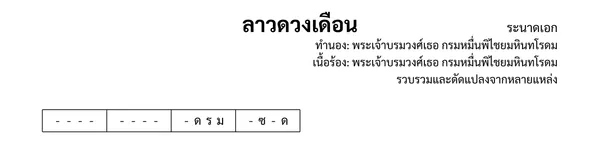
The <header> can carry several metadata elements:
<header> <title>ลาวดวงเดือน</title> <composer><text align="right">ทำนอง: พระเจ้าบรมวงศ์เธอ กรมหมื่นพิไชยมหินทโรดม</text></composer> <lyricist><text align="right">เนื้อร้อง: พระเจ้าบรมวงศ์เธอ กรมหมื่นพิไชยมหินทโรดม</text></lyricist> <arranger><text align="right">รวบรวมและดัดแปลงจากหลายแหล่ง</text></arranger> <tuning reference="khrueang-sai"/> <license>PUBLIC DOMAIN</license></header><lyricist>names the lyric writer.<arranger>names who adapted or transcribed the piece.<tuning>records the tuning system. Thereferenceattribute names a standard tuning.<license>states the copyright terms.
These are metadata for the file and the tools that read it. Whether they print on the page is a rendering decision.
Nathap
Section titled “Nathap”<nathap> records the drum cycle the piece is played over. It sits in <direction> and is metadata on the same terms as <chan>:
<nathap value="ลาว"/>It carries the information to editors and playback engines. It does not generate a printed label.
Next, see Validating and going further for schema validation, the Playground, and where to go from here.